Viewing Workflows
To view the workflow assigned to systems, follow these steps:
- Go to Application Menu > Data Catalog > Metadata Manager.
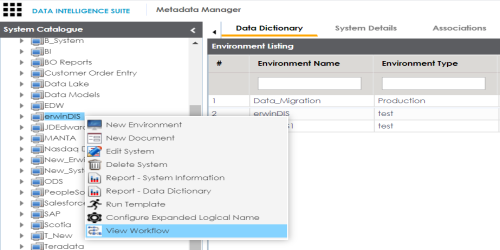
- Under the System Catalogue pane, right-click a system.
- Click View Workflow.
- Use the following options:
- Collapse Roles/Expand Roles
- You can collapse roles or expand roles for all the stages using this toggle button.
- Collapse Users/Expand Users
- You can collapse users or expand users for all the stages using this toggle button.
- Hide Users & Roles/Expand Users & Roles
- You can hide users and roles or expand users and roles for all the stages using this toggle button.
- Export Image
- You can download the workflow image in .jpg format using this button.
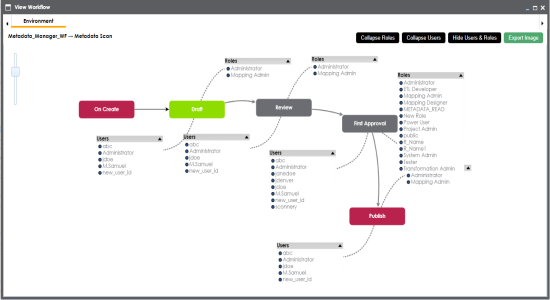
The assigned workflow appears with users and roles corresponding to each stage of the workflow.
|
Copyright © 2020 erwin, Inc.
All rights reserved.
|
|